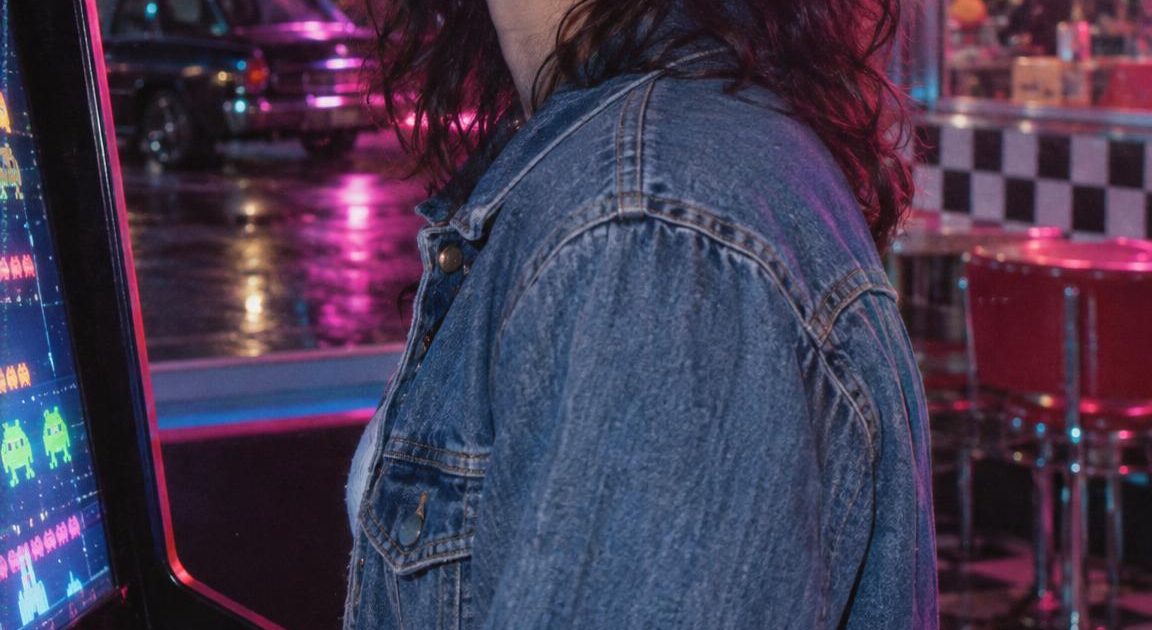
This Neon VHS Memory 80s Trend Effects prompt turns a portrait into a five-second arcade-to-diner memory clip for Reels, TikTok, or a retro campaign teaser.
What this trend is
The current 1980s nostalgia video trend starts with a clean portrait, then drops that person into a short analog-looking scene. Neon signs, arcade light, camcorder softness, scanlines, and a quick scene change do most of the work. The look has been circulating in prompt-sharing reels, including this 80s video trend reel, while recent search results still point to photo-to-video 80s prompts built around arcades, prom nights, and VHS texture.
The key choice here is restraint. The portrait stays readable. The jacket and face remain the visual anchor while the background moves from an arcade cabinet to a neon diner. That makes the clip feel like a memory instead of a costume change.
Neon VHS Memory 80s Trend Effects prompt
Arcade to neon diner
Start with a vertical portrait of a fictional adult in a casual denim jacket. Preserve the face, hairstyle, expression, and outfit throughout. Begin beside a glowing arcade cabinet at night, with cyan and magenta neon across the face. Move through a brief VHS-style transition into a chrome neon diner, keeping the same person centered in frame. Use soft camcorder motion, analog grain, gentle scanlines, color bleed, and a warm 1980s night mood. Keep the result realistic, nostalgic, and free of text or logos.Settings: 80s Trend Effects; effect: 80s trends arcade night; ratio: 9:16; duration: 5 seconds; input: a generated vertical portrait.
Variations
Late-night diner cut
Start with the same vertical portrait of a fictional adult in a casual denim jacket. Preserve the face, hairstyle, expression, and outfit without changing identity. Place the person outside a chrome diner at night, framed by red and cyan neon reflections on wet pavement. Add a subtle VHS home-video finish, handheld camcorder drift, analog grain, scanlines, and mild chromatic bleed. Hold the person as the clear focal point. Keep it realistic, intimate, and free of text or logos.Settings: 80s Trend Effects; effect: 80s trends diner night; ratio: 9:16; duration: 5 seconds; input: the same generated vertical portrait.
Why this Neon VHS Memory 80s Trend Effects prompt works
- It gives the model one person to protect before asking for any atmosphere or transition.
- The wardrobe is simple and specific, so the model has fewer details to reinterpret between scenes.
- Arcade neon and a chrome diner create a clear visual route. The cut has somewhere to go.
- VHS details are named as texture, not as the subject. The face stays ahead of the effect.
- The 9:16 frame puts the clip straight into a social-video shape without cropping the portrait later.
Getting a cleaner result
Use a sharp, front-facing input image with one person and an uncluttered background. A portrait with even face lighting gives the effect more room to add colored neon without losing eyes or skin tone. Avoid small logos, busy printed clothing, or a crowd. Those details can pull attention away from the person during the transition.
For a softer memory feel, choose a portrait with a relaxed expression and side light. For a louder edit, keep the same input but select the diner scenario and cut the finished clip to a beat. The effect already supplies motion, so extra camera directions usually make the result less stable.
For context on the broader format, Media.io’s 80s video guide also describes the current mix of portrait animation, VHS grain, neon scenes, and vertical social-video outputs.
More video prompt examples
Browse the 80s Trend Effects Prompts category for examples, or try a different motion model in Grok Imagine Video 1.5 Prompts.
Run this prompt yourself
Every example above was generated on Wiro. Paste the prompt, pick the model, and get your own result.


