This Subway Violin Rehearsal Veo 3.1 prompt makes a one-take music scene with a planned reveal, real station atmosphere, and sound that follows the action. Use it for a moody vertical clip that needs movement without fast edits.
Main example
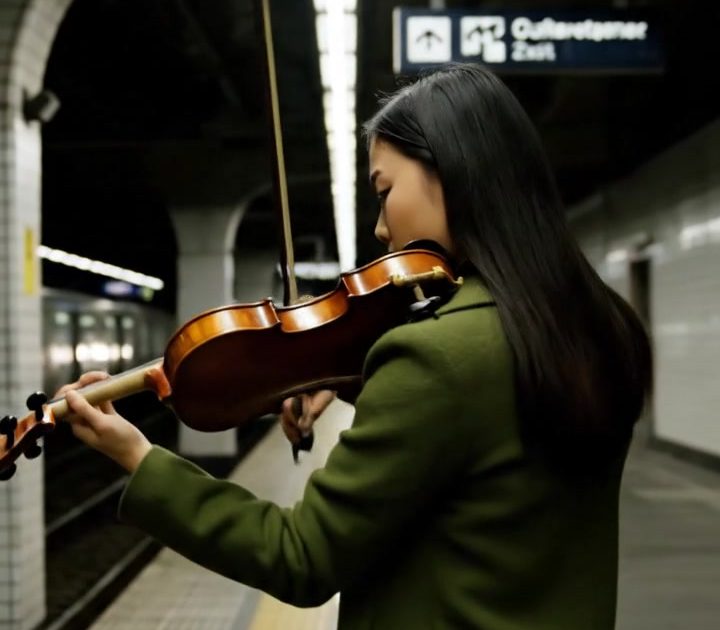
One continuous handheld tracking shot through an empty underground station after the last train. A young violinist in a moss-green coat rehearses beneath a row of fluorescent lights; she walks beside the platform edge while playing a short, clear melody. The camera begins behind her shoulder, passes her reflection in the train window, then lands on her focused face as a train rushes through the far track. Natural synchronized audio: solo violin, station reverb, approaching train, air brake hiss. No captions or logos.Settings: Google Veo 3.1 Fast, 9:16, 720p, 6 seconds, text-to-video, synchronized natural audio.
Variations
Violin case reveal
A smooth low-angle tracking shot follows a violin case rolling along a nearly empty underground platform, then tilts up to reveal a violinist in a rust-red coat playing under a flickering station sign. She stops on the final note as the tunnel wind moves her scarf. Cool teal station light, wet floor reflections. Natural synchronized audio: violin phrase, rolling wheels, tunnel wind, a distant train bell. No captions or logos.Settings: Google Veo 3.1 Fast, 9:16, 720p, 6 seconds, text-to-video, synchronized natural audio.
Why this Subway Violin Rehearsal Veo 3.1 prompt works
- It tells Veo where the camera begins, what it passes, and where it ends. That gives a six-second shot a usable arc.
- One performer and one instrument keep the scene legible while still testing precise hand and prop motion.
- The reflection and far-track train add depth without demanding a new location or a second cut.
- Each sound is attached to a visible source: bow, tunnel, train, and brake. This makes the audio direction concrete.
- Fluorescent light, teal tones, wet reflections, and coat color create an editorial look with a short prompt footprint.
A subway is useful because it already has motion, echo, and strong lines. The camera can follow those lines instead of searching for a composition. The performer gives the shot a human center, while the arriving train provides the final beat.
Keep the melody brief. A short phrase is easier to sync with the train reveal than a full song. If the clip needs a warmer mood, trade the fluorescent station for an old platform with sodium lamps. If it needs more energy, start on the bow hand and pull back to the rushing train. The camera route should still stay simple.
More Veo 3.1 prompts
See more video setups in Veo 3.1 Prompts.
- Midnight Tram Letter Veo 3.1 Prompt
- Night Market Noodles Veo 3.1 Prompt
- Seaside Perfume Reveal Veo 3.1 Prompt
- Kling 3.0 Prompts for another cinematic-video model.
More on the model itself: Veo 3.1 on Google DeepMind.
Run this prompt yourself
Every example above was generated on Wiro. Paste the prompt, pick the model, and get your own result.