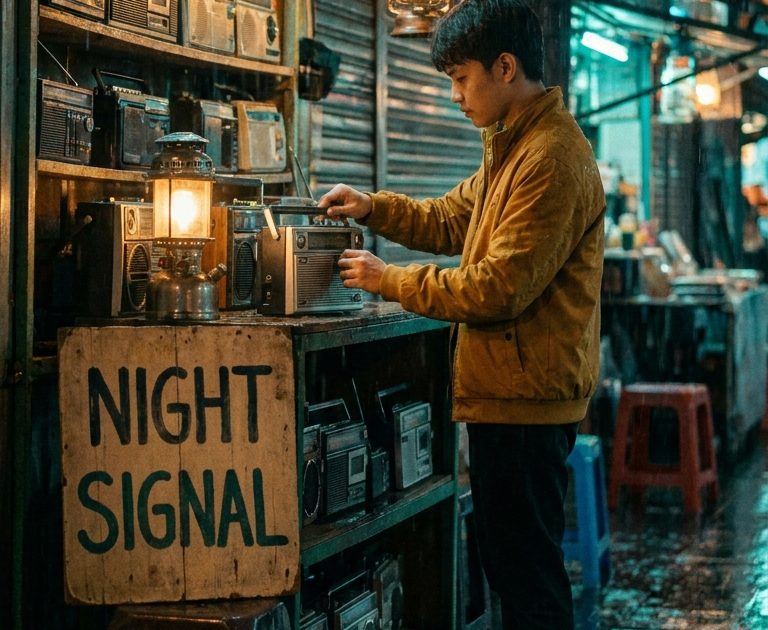
This Night Market Radio MiniMax H3 prompt makes a rain-lit vertical video with a readable shop sign, a clear camera path, and sound cues that suit a social reel or a moody product story.
Main Night Signal Shot
integrated_multimodal_description: [Shot 1, 0.00-2.40] A compact night market radio stall glows under warm rain, shelves filled with vintage radios, a young vendor in a mustard jacket tunes a small silver radio with both hands. The camera makes a slow push through hanging lanterns toward the counter. The radio dial settles on 88.5 and the hand-painted sign behind the vendor clearly reads NIGHT SIGNAL. [Shot 2, 2.40-5.00] The vendor smiles as the radio catches a jazz station, raindrops ripple in puddles outside, two shoppers pass in soft focus. Natural realistic motion, cinematic 35mm film grain, teal and amber palette. overall_soundscape: steady rain on awnings, distant market chatter, radio static resolving into warm jazz. non_diegetic_music: none.Settings: MiniMax H3, text-to-video, 5 seconds, 768P, 9:16.
The first shot gives the model fixed anchors: a small stall, the silver radio, mustard jacket, lanterns, and rain. The second shot only develops those anchors, so the camera has a simple job. The sign is intentionally stated as a physical object behind the vendor, rather than a floating graphic. That makes the request for text part of the scene.
Variations
Umbrella Radio Pickup
integrated_multimodal_description: [Shot 1, 0.00-2.50] A rain-soaked night market radio stall, viewed from waist height. A woman in a red raincoat selects a turquoise transistor radio, then holds it close as its tiny amber tuner needle moves. The camera arcs gently from the radio to the lantern-lit alley. [Shot 2, 2.50-5.00] She nods to the rhythm and walks away beneath a clear umbrella while the stall owner waves from the doorway. Rich cyan reflections, tactile documentary feel, 50mm lens. overall_soundscape: rain, footsteps on wet stone, a soft burst of radio pop music, distant scooters. non_diegetic_music: none.Settings: MiniMax H3, text-to-video, 5 seconds, 768P, 9:16.
This version trades the slow push for a small arc. It also makes the radio the opening subject, which is useful when the clip needs to feel closer to a product shot. The red coat and turquoise radio create a quick color contrast without asking for a crowded composition.
Why this Night Market Radio MiniMax H3 prompt works
- It uses two timed shots, so the five-second story has a beginning and a payoff.
- It names the camera move once and keeps it modest.
- It separates ambient rain, diegetic radio sound, and music instead of blending them into a vague mood.
- It gives the text request a stable placement and asks for a short, readable phrase.
- It uses repeated scene anchors to help the people, props, and color palette hold together.
MiniMax H3 responds well to a complete audiovisual timeline. Its official prompt guidance separates the visual description from the overall soundscape and non-diegetic music. That structure keeps a clip from becoming a list of disconnected style words. For this scene, the rain belongs in the soundscape, while the station arriving on the radio belongs in the action.
Keep the shot count low for a short clip. A five-second render cannot comfortably carry a wide establishing shot, a close-up, a character turn, a crowd beat, and a dramatic finish. Two connected beats give the edit room to breathe. If the title card matters more than the vendor, shorten the requested words and move the sign nearer to the center of the frame.
For a different result, change one structural item at a time. Switch the weather, the product color, or the music source, but leave the shot timing intact. That makes it easier to see which instruction changed the output. The official MiniMax H3 prompt guide is useful for longer timelines and reference-frame work.
More MiniMax H3 prompts
Browse the full MiniMax H3 Prompts collection for more clips. For another rain-and-city video approach, see Sora 2 Prompts.
Run this prompt yourself
Every example above was generated on Wiro. Paste the prompt, pick the model, and get your own result.




2 Comments